
How to Set Up AI on Your Computer (No Coding Needed)
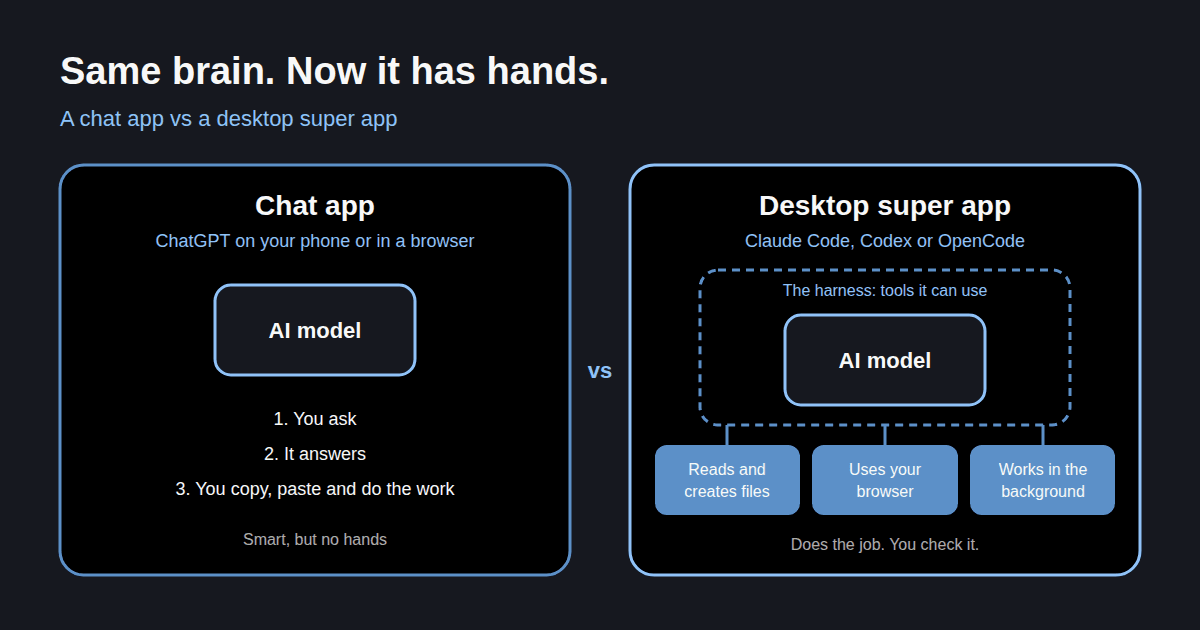
If you've only ever used ChatGPT on your phone or in a browser tab, you're using a fraction of what AI can do. This guide gets you set up with a desktop "super app" so AI can do jobs for you, not just answer questions.
Three routes: Claude, ChatGPT with Codex, or a budget setup. Pick one. You can always try the others later.
Chat apps vs super apps
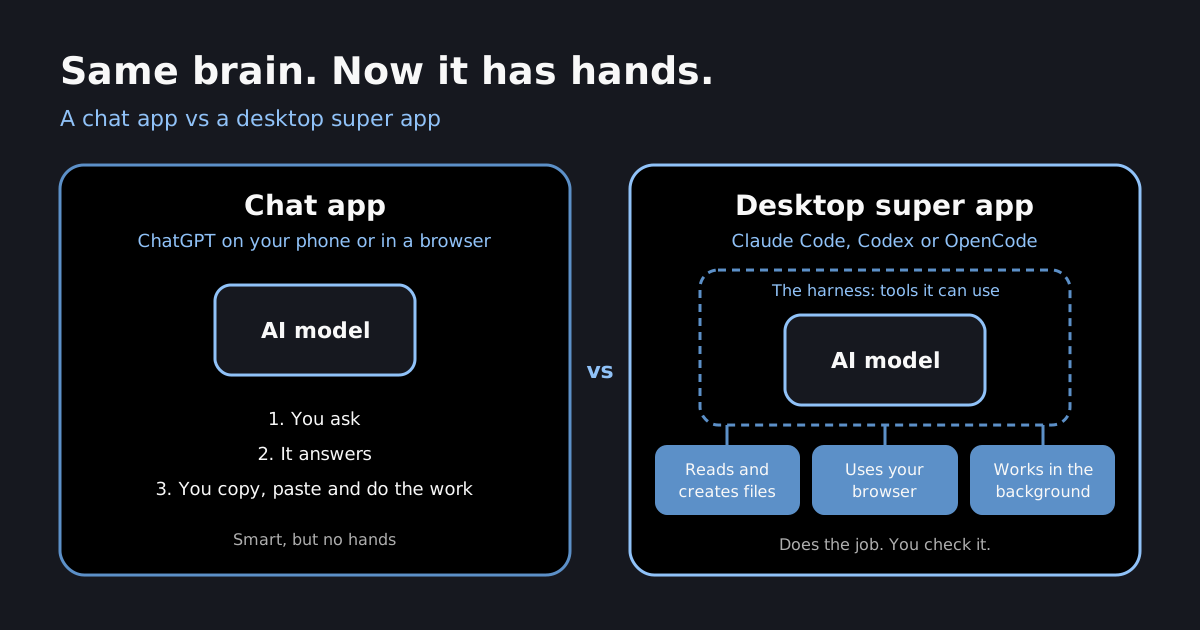
A chat app is a conversation. You ask, it answers, you copy and paste the answer somewhere and do the work yourself.
A super app wraps the same AI model in a harness: a set of tools it can use on your computer. It can read and create files, run tasks in the background, and use your web browser to click, type and fill in forms.
Same brain, but now it has hands. That's the whole difference, and it's why everything I share in the newsletter starts here.
Which one should you pick?
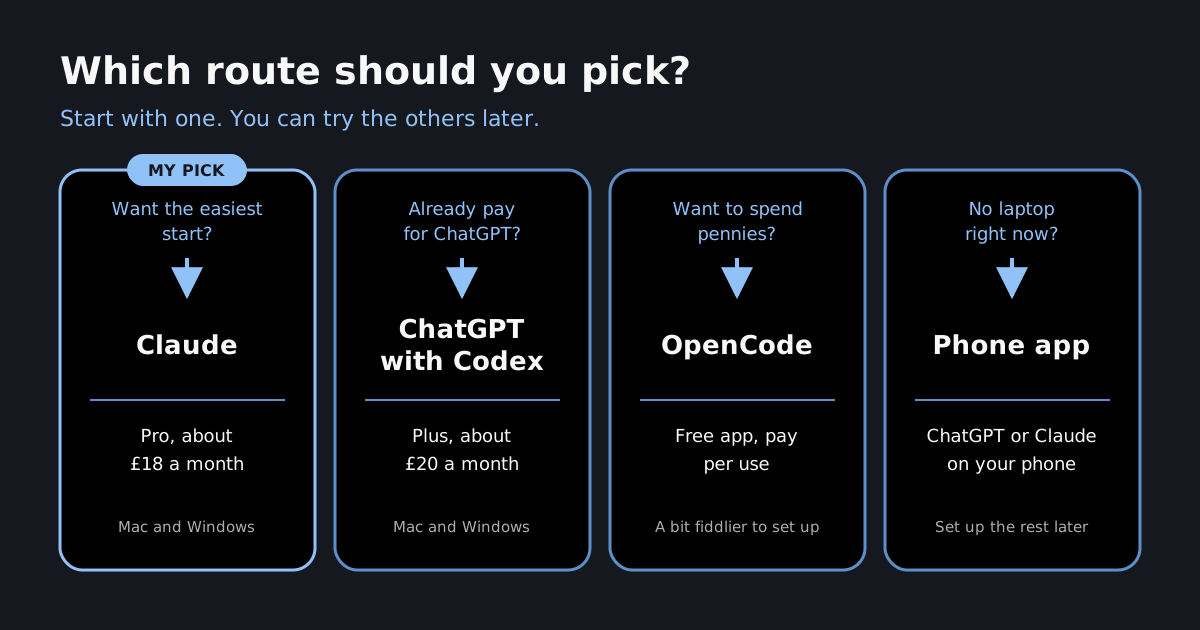
| Claude | ChatGPT with Codex | Budget (OpenCode) | |
|---|---|---|---|
| Cost | Pro, about £18/month | Plus, about £20/month | Free app, pay per use (pennies to a few pounds) |
| Mac / Windows | Both | Both | Both (beta) |
| Setup | Easy | Easy | A bit fiddlier |
| Best for | Most people. My pick | People already paying for ChatGPT | Trying it cheaply, or going deep on open models |
Claude and ChatGPT are close enough now that you won't go wrong with either. I lean Claude. Anthropic's focus on safety sits better with me, I find the app easier, and its remote control from my phone has been more reliable for me. Codex has a brilliant voice mode, where you just talk to it like Jarvis while it works in the background.
I'm on Claude's top plan (Max, about £180 a month) because I use it all day for work. You don't need that. The £18 plan is plenty to start.
Route 1: Claude
-
Go to claude.com/download and install the app for your computer (Mac, or Windows 10 and above).
-
Sign in, then upgrade to Pro. Chat works on the free plan, but Claude Code needs a paid plan.
-
Open the Code tab, the
</>icon top left. This is Claude Code: the part that works on your files.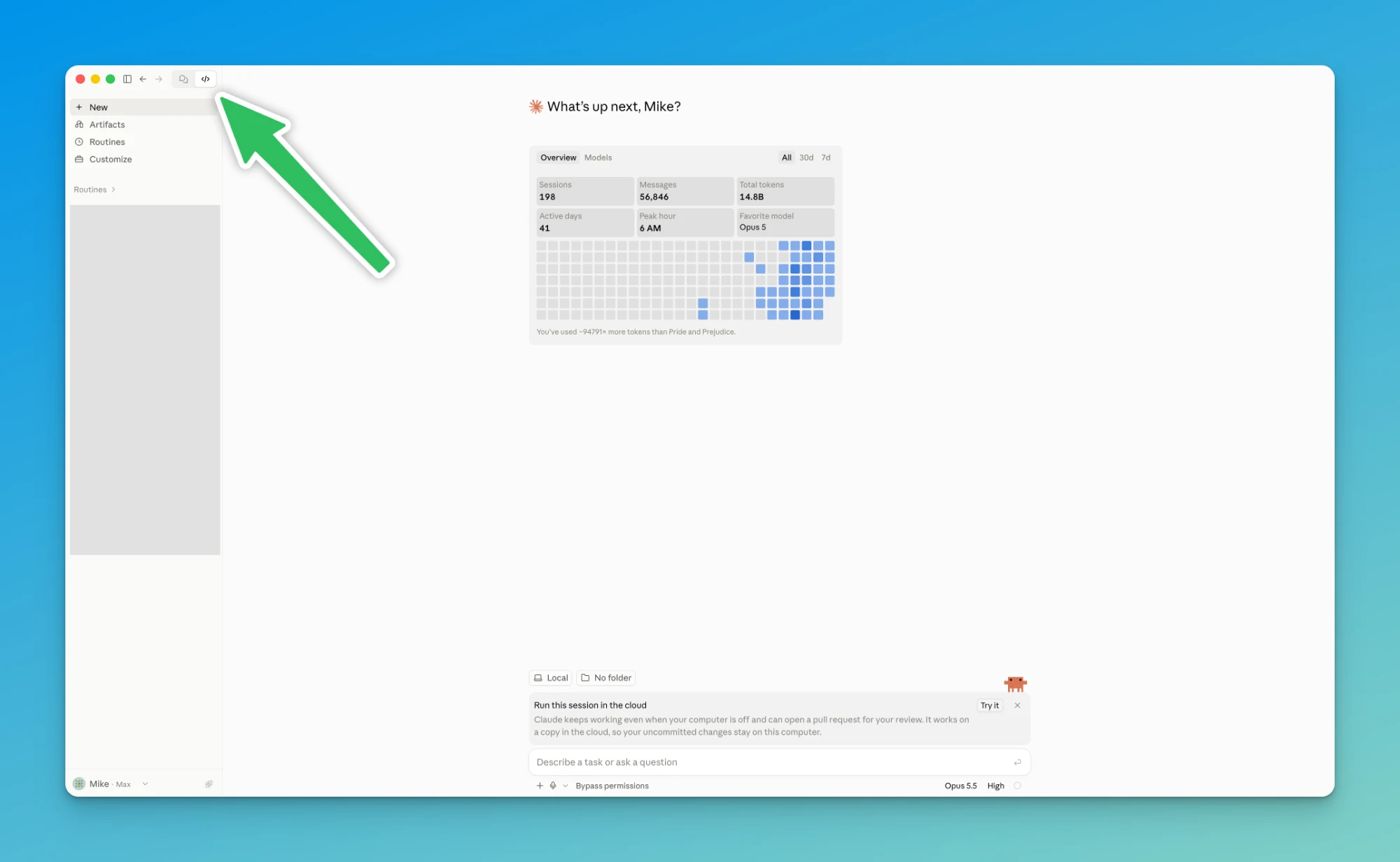
-
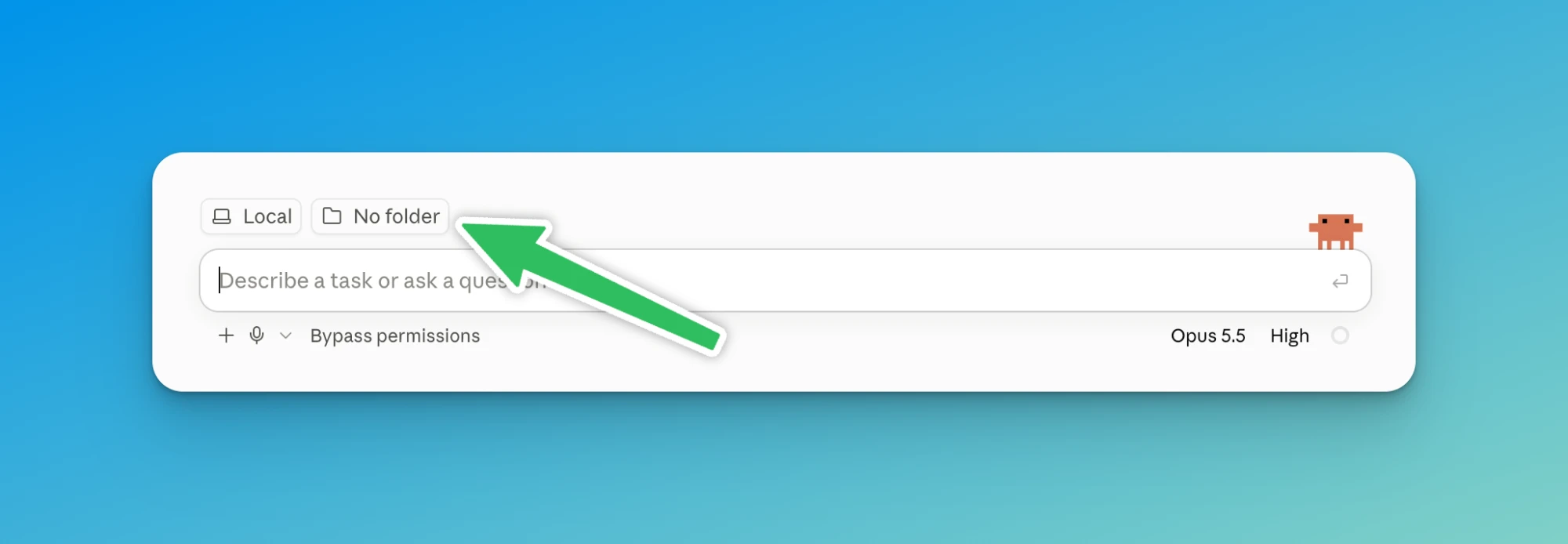
Choose a folder for it to work in. Click No folder just above the message box and pick it (see "The one rule" below).
-
For the browser bit (filling in forms, listing things for sale), install the Claude in Chrome extension from the Chrome Web Store and sign in with the same account. It's included on every paid plan.
You'll also notice Claude no longer makes you choose between chat and bigger tasks (what used to be called Cowork). Since mid-September they're one experience: ask a quick question or hand over a bigger job from the same place.
Route 2: ChatGPT with Codex
-
Download the ChatGPT desktop app for Mac or Windows.
-
Sign in, then upgrade to Plus if you're not on it already.
-
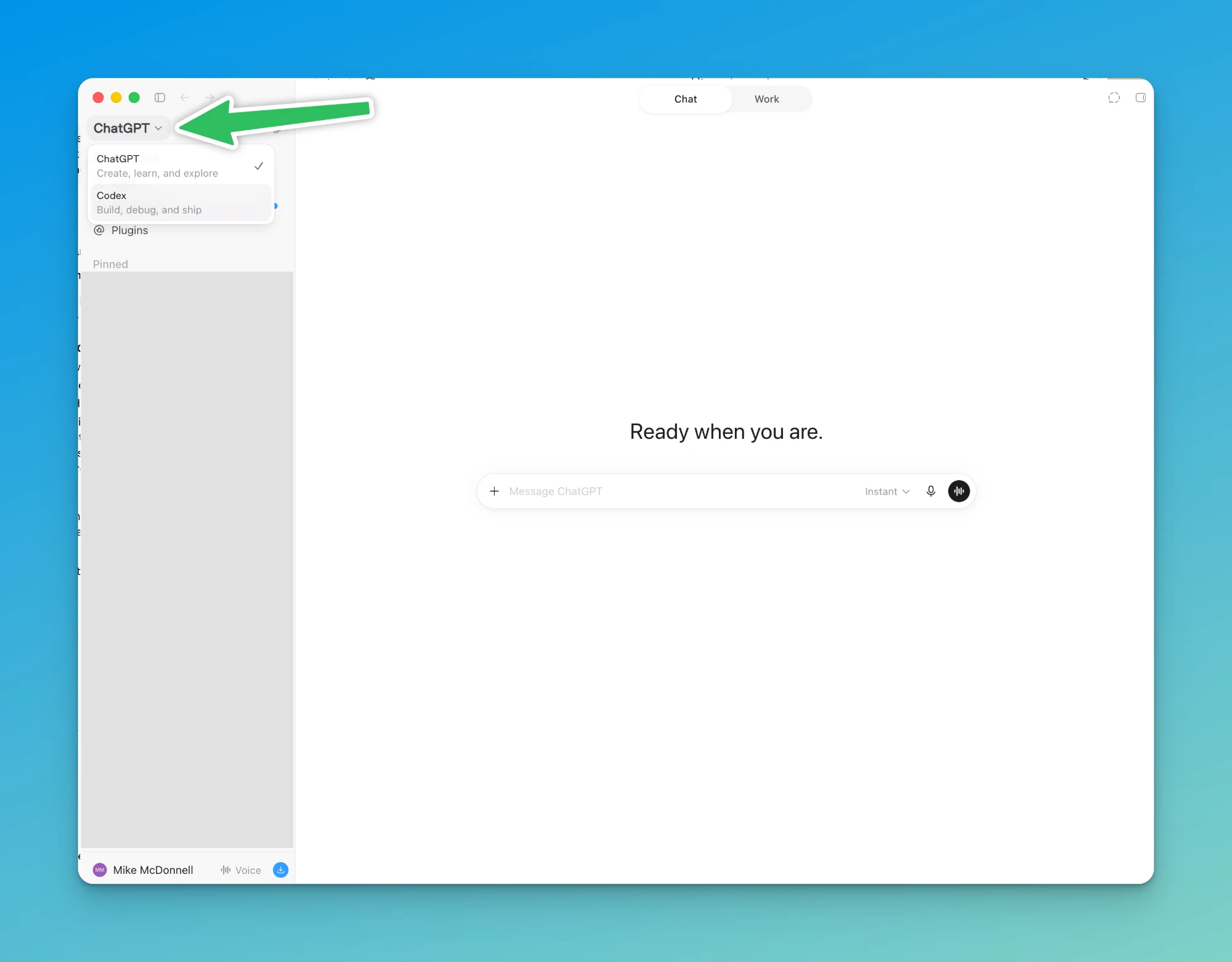
Top left, switch from ChatGPT to Codex. Codex is the part that works on your files and computer.
-
Click Choose project and pick the folder for it to work in.
Inside the ChatGPT side you'll also see a Chat / Work toggle. Chat is the normal conversation. Work is for bigger jobs like building documents, slides and spreadsheets. For everything I'll be teaching, Codex is where you want to be.
Route 3: On a budget with OpenCode
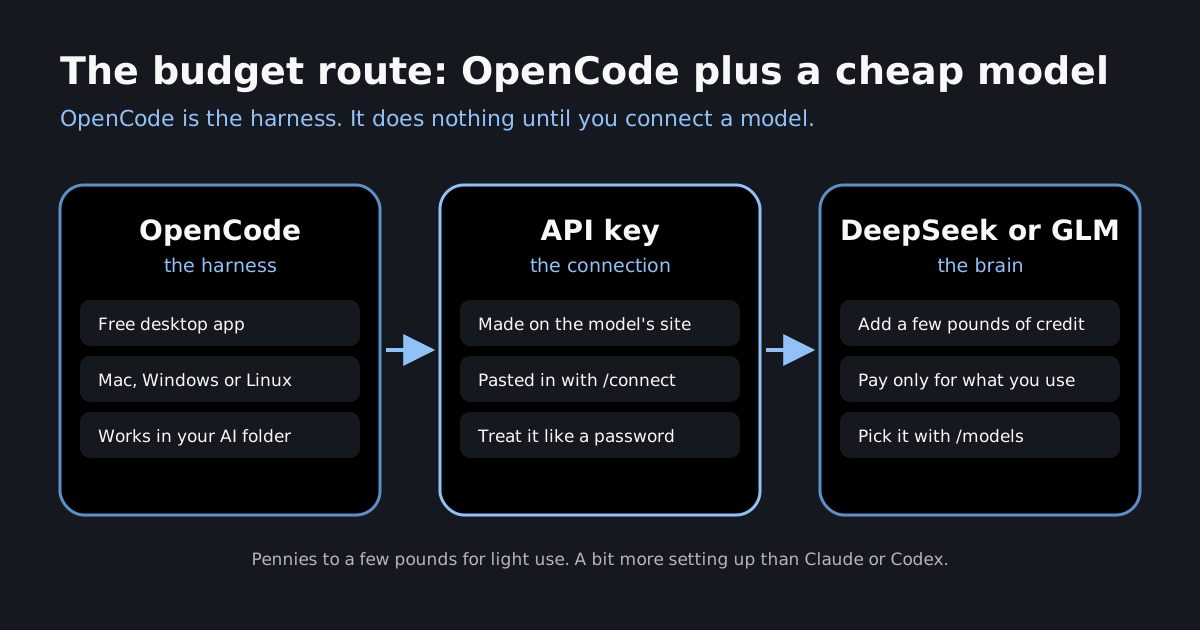
OpenCode is a free app that does the same job as Claude Code or Codex. The difference is that it doesn't come with a model. You bring your own, and pay only for what you use.
That's where open-source models come in. The Chinese labs (DeepSeek, Zhipu's GLM, Moonshot's Kimi) release models that cost a tiny fraction of Claude or ChatGPT. I've used DeepSeek and GLM in OpenCode, and Kimi in other tools.
My honest take: about six months ago, GLM in OpenCode felt roughly 70% as good as Claude. They've improved a lot since, and I've learned why they were falling short. It mostly comes down to how you set them up, which I'll cover in a series on getting open models to perform like the big ones.
One thing to understand first: OpenCode isn't a chat app like ChatGPT. It's the harness. Until you connect a model to it, it can't do anything.
Setting it up with DeepSeek
- Download OpenCode from opencode.ai/download (Mac, Windows or Linux; the desktop app is in beta).
- Go to the DeepSeek platform (platform.deepseek.com), create an account and add a few pounds of credit.
- Create an API key and copy it. Treat it like a password: don't share it or paste it anywhere public.
- In OpenCode, connect a provider (type
/connect), search for DeepSeek and paste your key. - Pick a model (type
/models). Start with DeepSeek's main model. - Choose your folder and you're away.
GLM works the same way, with a key from Z.ai instead of DeepSeek.
If this feels like a lot, start with Route 1 or 2 and come back to this once you're comfortable. Nothing wrong with that.
Can't find the folder button?
This was the most common reply after I sent this guide to my newsletter, and it's nearly always the same thing: you're in the website or the phone app. Those are great for questions, but they can't see the files on your computer, so there's no folder button to find.
Download the desktop app (claude.com/download or chatgpt.com/download), open it and look again. Then check:
- In Claude, you're on the Code tab (the
</>icon top left) and it says Local next to No folder. - In ChatGPT, you've switched to Codex top left. The folder button there is called Choose project.
- No Code tab, or it's locked? Claude Code needs a paid plan. Pro is enough.
- Browser tasks not working in Claude? Check the Claude in Chrome extension is installed and signed in to the same account.
The one rule: give it one folder
This is the bit that confused me most when I started.
These apps work inside a folder you choose. Whatever's in that folder, they can read and change. So while you're learning:
- make a new folder on your desktop called AI
- always start your sessions in that folder
- don't point it at your whole computer and let it do whatever it wants
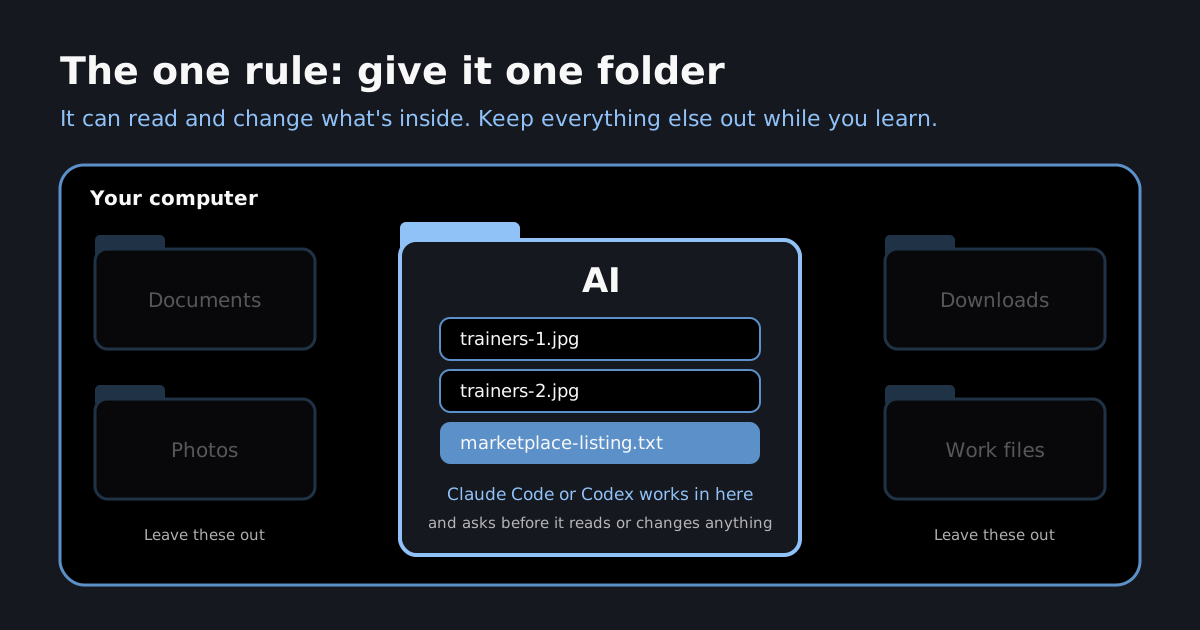
The apps will also ask your permission before reading files, changing things or using your browser. Read what they're asking before you say yes. That's a feature, not an annoyance.
Your first tasks
Drop a couple of photos of something you'd sell into your AI folder. Then paste this:
Look at the photos in this folder. Write me a Facebook Marketplace listing: a title, a fair price based on what similar items go for, and a short description that would make someone message me.
In a minute or so you'll have a listing ready to go. That's AI looking at files on your computer and doing a job, not just answering a question.
I took it further in this video: AI opening Marketplace in the browser and filling the listing in for me, so all I do is check it and hit publish.
Not selling anything? The same shape works for loads of jobs: say what you want done, where the stuff is, ask it to ask you questions, and say where to stop. A few to try, easiest first:
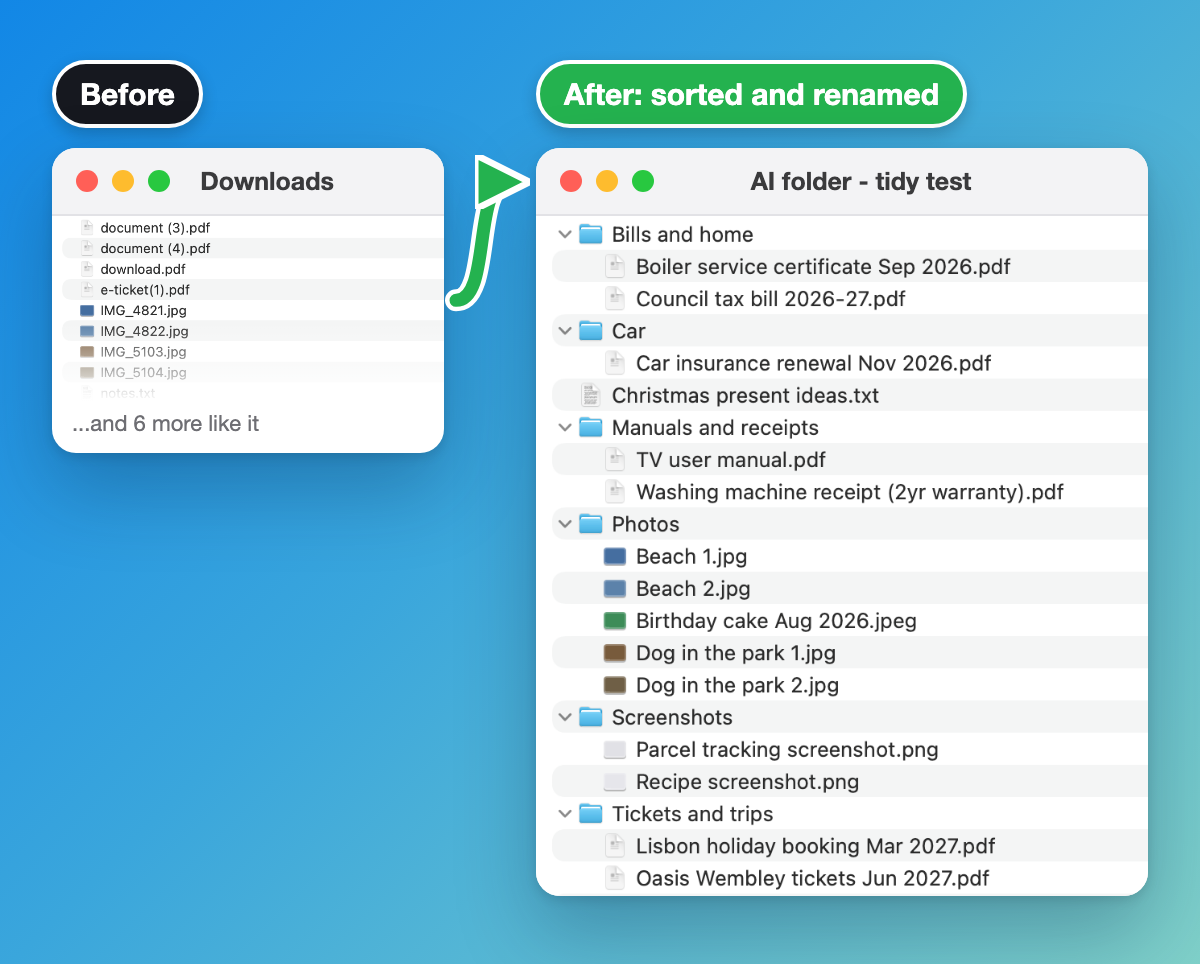
Tidy a messy folder. Drag 20 or so files out of your Downloads into the AI folder.
This folder is a mess. Sort everything into sub-folders that make sense, and rename each file so I can tell what it is without opening it. Show me your plan before you move anything, and ask me if you're not sure where something goes.
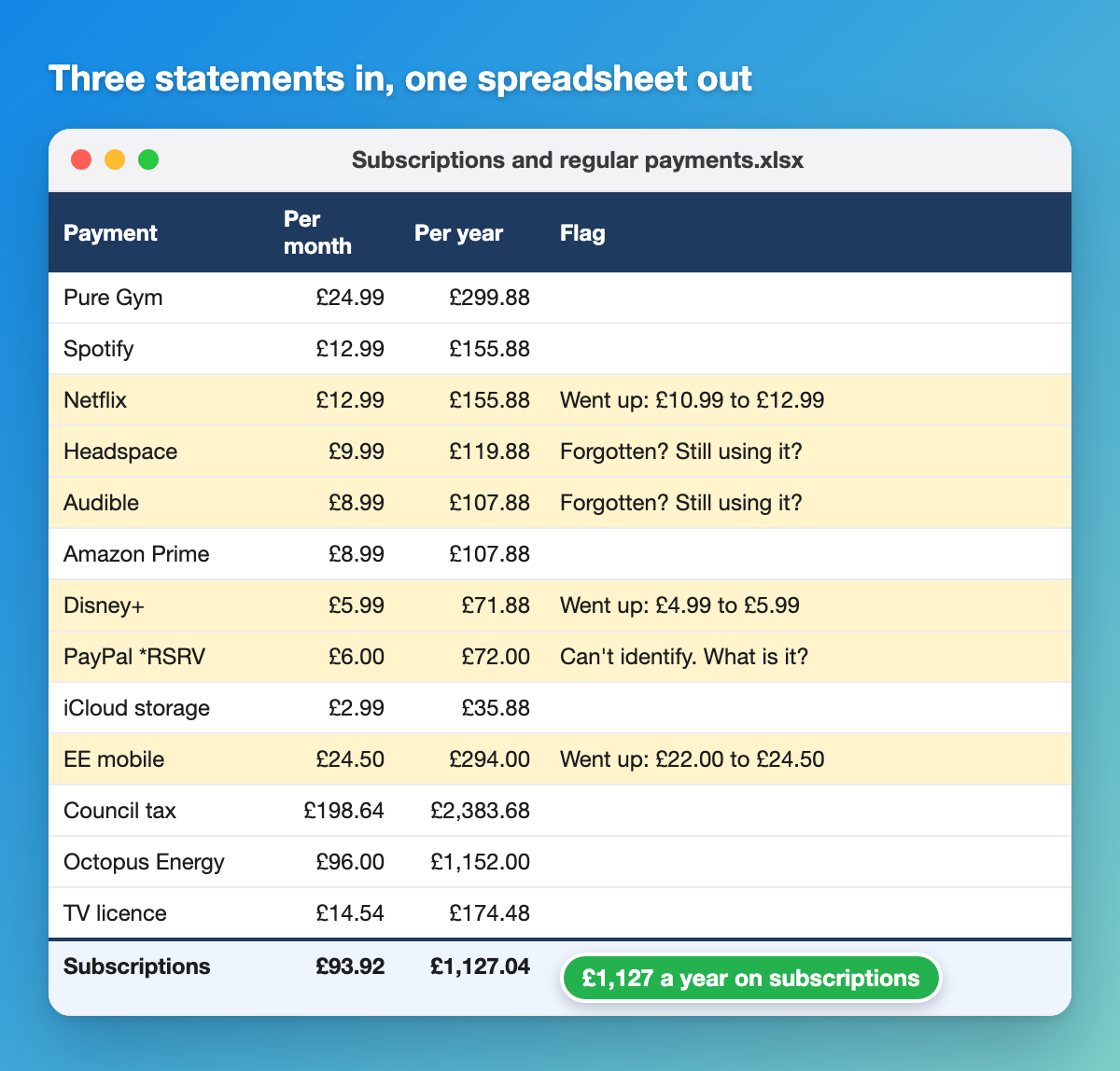
Find the subscriptions you forgot about. Download three months of bank statements as PDFs from your banking app. Don't give it your bank login, the PDFs are all it needs.
In this folder are three months of my bank statements. Find every subscription and regular payment and put them in a spreadsheet with what each one costs a month and a year. Flag anything that's gone up in price and anything I might have forgotten about. Ask me about any payments you can't identify. Save the spreadsheet in this folder and tell me the yearly total.
Do your expense claim. Receipt photos plus a blank copy of your company's expense form (check your company is fine with you using AI on work documents first).
In this folder are photos of my work receipts from [month] and a blank copy of my company's expense form. Fill in the form with one line per receipt: the date, who it was from, what it was for, the amount and the VAT. Ask me about anything you can't read or can't work out the reason for. Save it as a new file and leave the original form as it is.
Check what your competitors charge. This one uses the browser.
Here are five of my competitors: [names or websites]. Go to each website and find what they charge for [your product or service], plus any offers or guarantees they mention. Put it all in a spreadsheet in this folder next to my prices. If a site's pricing isn't clear, tell me rather than guessing. Don't fill in any contact forms or sign up for anything.
There are more worked examples in six agentic AI examples you can try today, and every prompt is in my prompt library. I send a new one every Sunday in The Growth Toolkit, with the prompt and a walkthrough.
Teach it about you: the memory file
Once you're set up, the biggest upgrade is a memory file. It's a plain text file in your AI folder that the app reads at the start of every session. In Claude Code it's called CLAUDE.md, in Codex it's AGENTS.md.
Put in who you are, how you like things written and anything it keeps getting wrong. Then you stop repeating yourself every time you open a new session. I keep one for everything I run, and it does more for the quality of what I get back than any clever prompt.
I'm showing how to write yours in the newsletter on Sunday 18 October.
No laptop?
Stick with the ChatGPT or Claude app on your phone for now. You'll still get plenty from the newsletter, and when you do get on a computer, this guide will be here.
Questions people ask
Why can't I find the folder button?
You're almost certainly in the website or the phone app, which can't see your files. Download the desktop app and look again. In Claude it's No folder on the Code tab. In ChatGPT, switch to Codex and click Choose project.
Do I need to know how to code?
No. Despite the names, Claude Code and Codex take plain English. You describe the job and it handles the technical bits, asking your permission before it changes anything. Most of what I use them for has nothing to do with code.
Should I use Claude or ChatGPT with Codex?
They're close enough now that you won't go wrong with either. I lean Claude, but if you already pay for ChatGPT, start with Codex.
Do I need a paid plan?
Yes for Claude Code: Pro is about £18 a month and plenty to start. Codex comes with ChatGPT Plus, about £20 a month. The budget route with OpenCode costs pennies to a few pounds.
Does Claude Code work on Windows?
Yes, on Windows 10 and above as well as Mac. The steps are the same.
Is it safe to let AI work on my computer?
Keep it in one folder while you're learning, and read what it asks before you say yes. It can only touch what's in the folder you pick.
What's next
This is the foundation for everything I share in The Growth Toolkit newsletter: the tips, the setups and the way I work with AI day to day. If you want to see where this goes, here's the AI personal trainer I built and the AI tools I rate for running a business.
The models get better every few months, and the people already set up are the ones who feel that first.
Stuck? If you're on the newsletter, reply to any of my emails and tell me where. I read every one.
Mike McDonnell. I write The Growth Toolkit, a free Sunday email on getting the most out of AI, with the setups I use explained in plain English.

Mike McDonnell
Entrepreneur, author, and mental health advocate based in Great Notley, Braintree, Essex. I write about building businesses while managing bipolar disorder.
You might also like
Agentic AI Examples You Can Try Today (October 2026)
Six agentic AI examples you can try on your own computer today, from tidying files to checking competitors. Get the prompt for each and see the result.
I Built an AI Personal Trainer That Checks In on Me (2026)
I was an online PT for 2 years. Here's the AI personal trainer I built that checks in on Telegram every night and reviews my photos. Get the full setup free.
Make.com Review UK: What My Real Automations Cost
An honest Make.com review from a UK agency owner. What Make is, how I use it at Glide Marketing, how the operations-based pricing really works, the pros, the cons, and my verdict.