
Agentic AI Examples You Can Try Today (October 2026)
Most lists of agentic AI examples are about banks, call centres and supply chains. Useful if you run one. Not much use if you want to know what an AI agent can do for you this week.
So here are six I've run on a computer with Claude Code, from a two-minute test to one that does a real chunk of a business owner's week. Every one comes with the prompt to copy and a screenshot of what came back.
The short version: agentic AI is AI that carries out a task instead of just answering a question. You give it a goal, it works out the steps, uses the tools it's been given (your files, your browser), checks its own work and comes back to you when it needs a decision.
What makes AI "agentic"?
A chatbot answers you. Ask it how to write a Marketplace listing, it tells you, and you go and do it yourself.
An agent does the job. You say "sell this", and it looks at the photos, checks what similar items go for, asks you about condition and postage, then fills the listing in. Same AI model underneath. I call the agent version a brain with hands.
To try any of these you need the desktop app, not the website or the phone app, because the desktop app can see the files on your computer. If you haven't set it up yet, my guide to setting up AI on your computer takes about 15 minutes and needs no coding.
6 agentic AI examples you can try today
Easiest first. Fill in anything in [square brackets] before you send it.
1. Sell something on Marketplace, Vinted and eBay
This is the one I filmed. Four photos of a LEGO plant pot and one prompt: it checked what the pot sells for on eBay and Vinted, asked me about condition and postage, wrote the listing and saved it on Facebook Marketplace as a draft with all four photos uploaded. You can watch the whole thing here, snag and all.
In this folder there are photos of [the item] that I want to sell on Facebook Marketplace. Research what it sells for used, and price it a little below the average because I want it sold quickly. Ask me any questions you need to list it properly. Fill in the listing in the browser and leave it as a draft so I can check it before it goes live.
Level up: the same item on three sites at once. The prompt is in the prompt library.
2. Tidy a messy folder
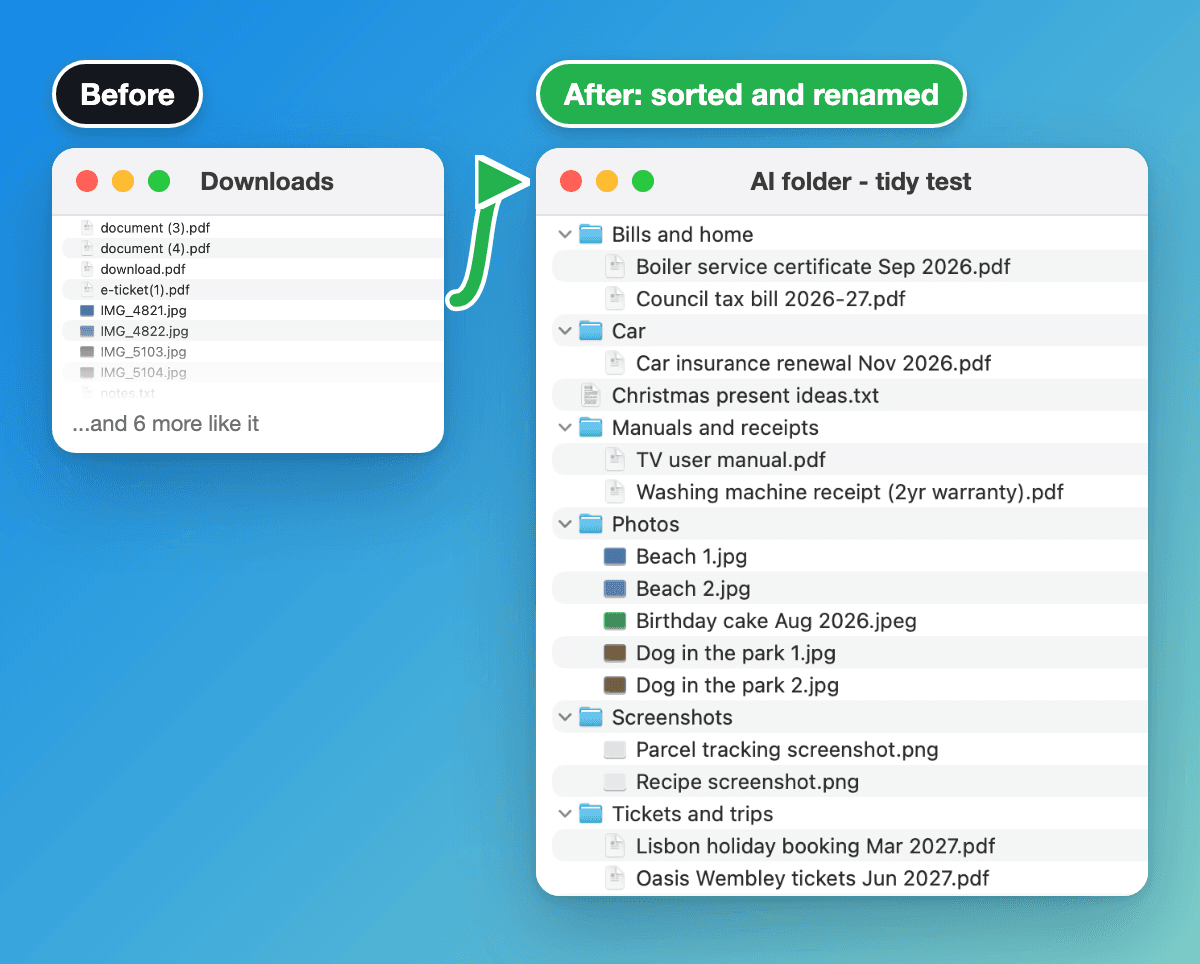
The best first test if you've never done this. Drag 20 or so files out of your Downloads into your AI folder and paste:
This folder is a mess. Sort everything into sub-folders that make sense, and rename each file so I can tell what it is without opening it. Show me your plan before you move anything, and ask me if you're not sure where something goes.
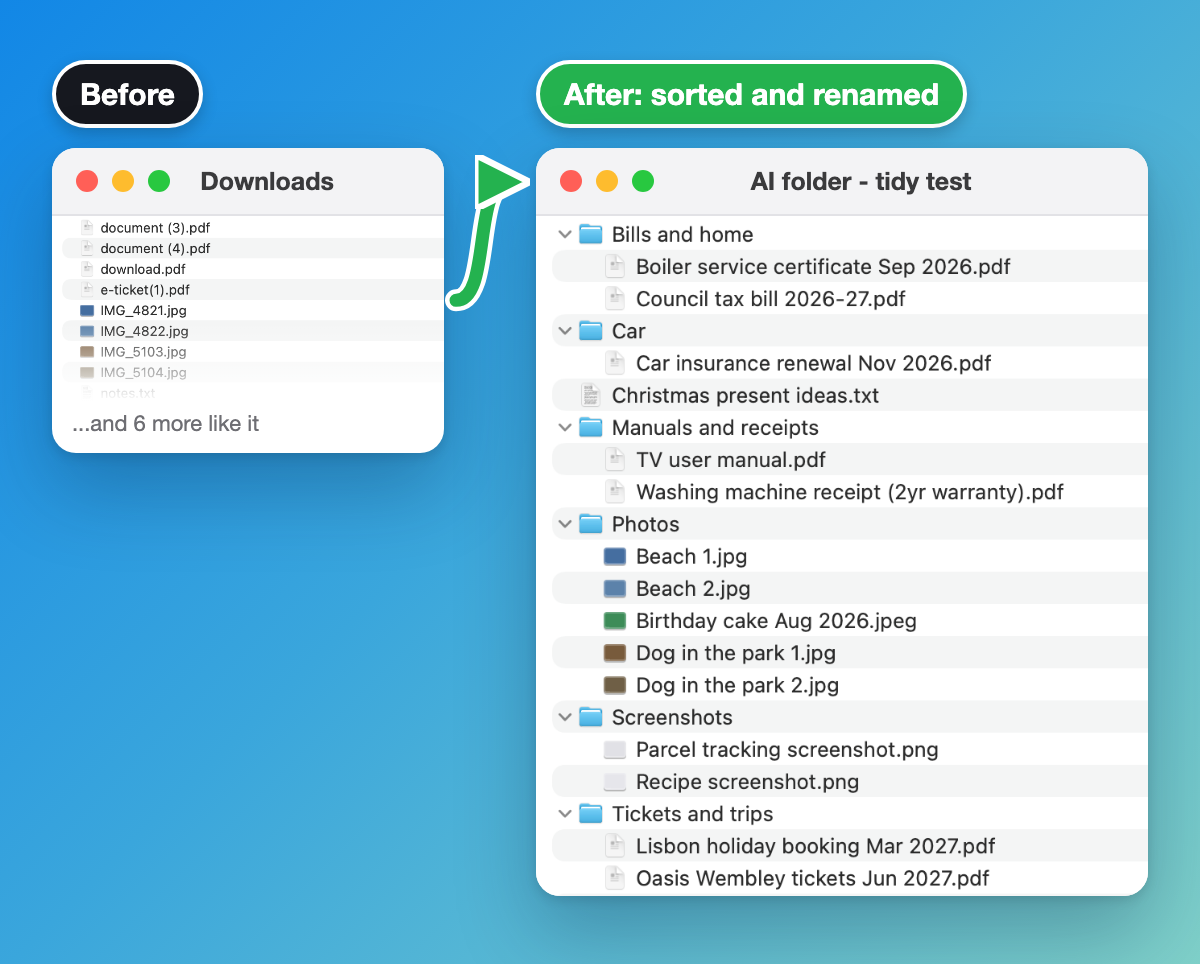
The "show me your plan" line is what makes it safe: you see what it's going to do before it touches a single file. I ran this on 15 made-up downloads. It opened each one to work out what it was, which is how "scan0001.pdf" became "Council tax bill 2026-27.pdf".
Level up: go the other way and have it build a folder from scratch for a big job like moving house. Get the prompt.
3. Find the subscriptions you forgot about
Download three months of bank statements as PDFs from your banking app. Don't give it your bank login, the PDFs are all it needs.
In this folder are three months of my bank statements. Find every subscription and regular payment and put them in a spreadsheet with what each one costs a month and a year. Flag anything that's gone up in price and anything I might have forgotten about. Ask me about any payments you can't identify. Save the spreadsheet in this folder and tell me the yearly total.
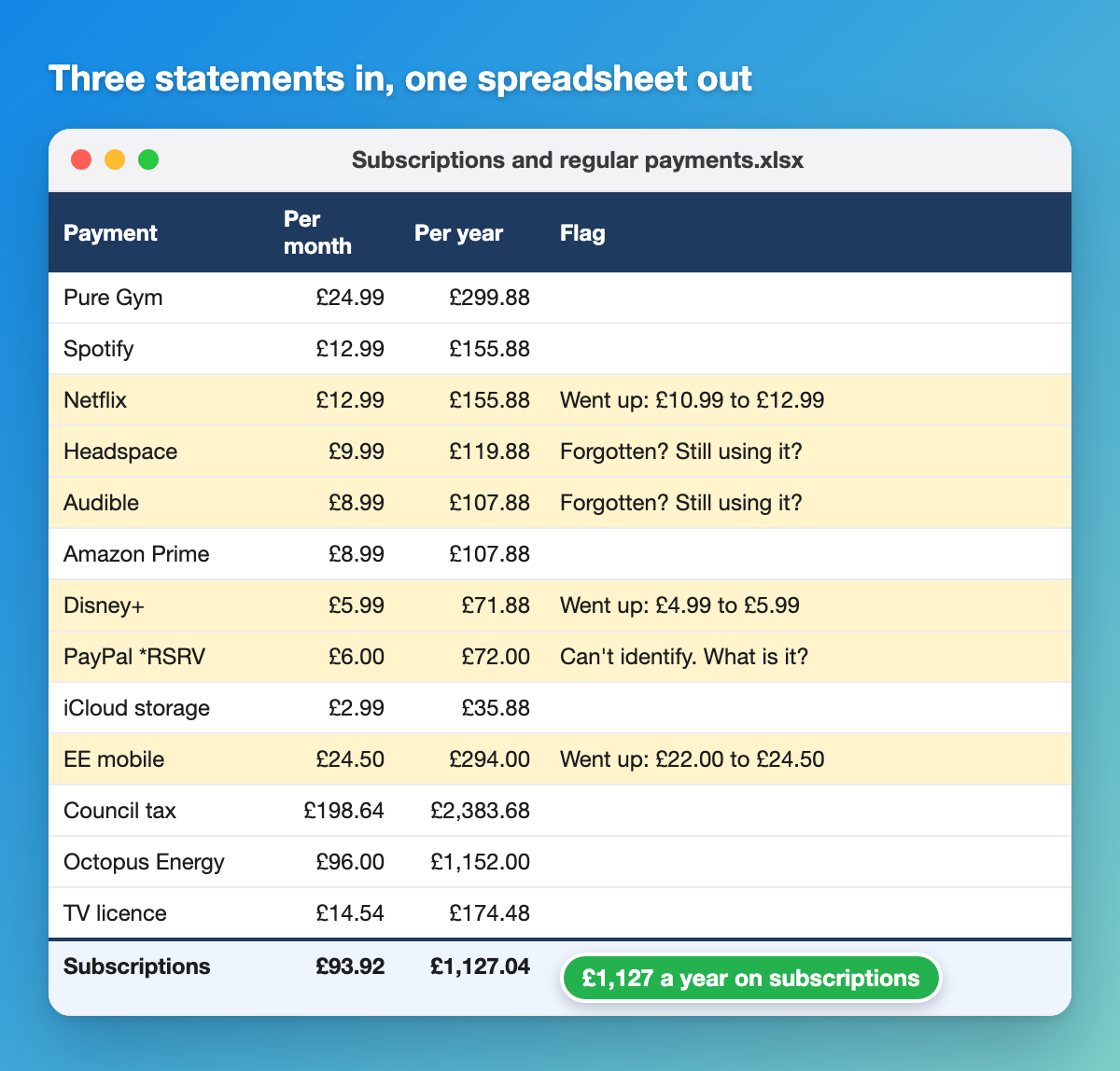
These statements are made up, but the result is what you'll get: price rises spotted month to month, the ones you've probably forgotten flagged, and a question about the payment it couldn't identify instead of a guess.
Level up: a cancel list with the steps for each one and any emails drafted. Get the prompt.
4. Fill in your expense claim from receipt photos
Quick check first: some companies have rules about putting work documents into AI tools, so make sure yours is fine with it. Then put your receipt photos in the folder with a blank copy of the expense form.
In this folder are photos of my work receipts from [month] and a blank copy of my company's expense form. Fill in the form with one line per receipt: the date, who it was from, what it was for, the amount and the VAT. Ask me about anything you can't read or can't work out the reason for. Save it as a new file and leave the original form as it is.
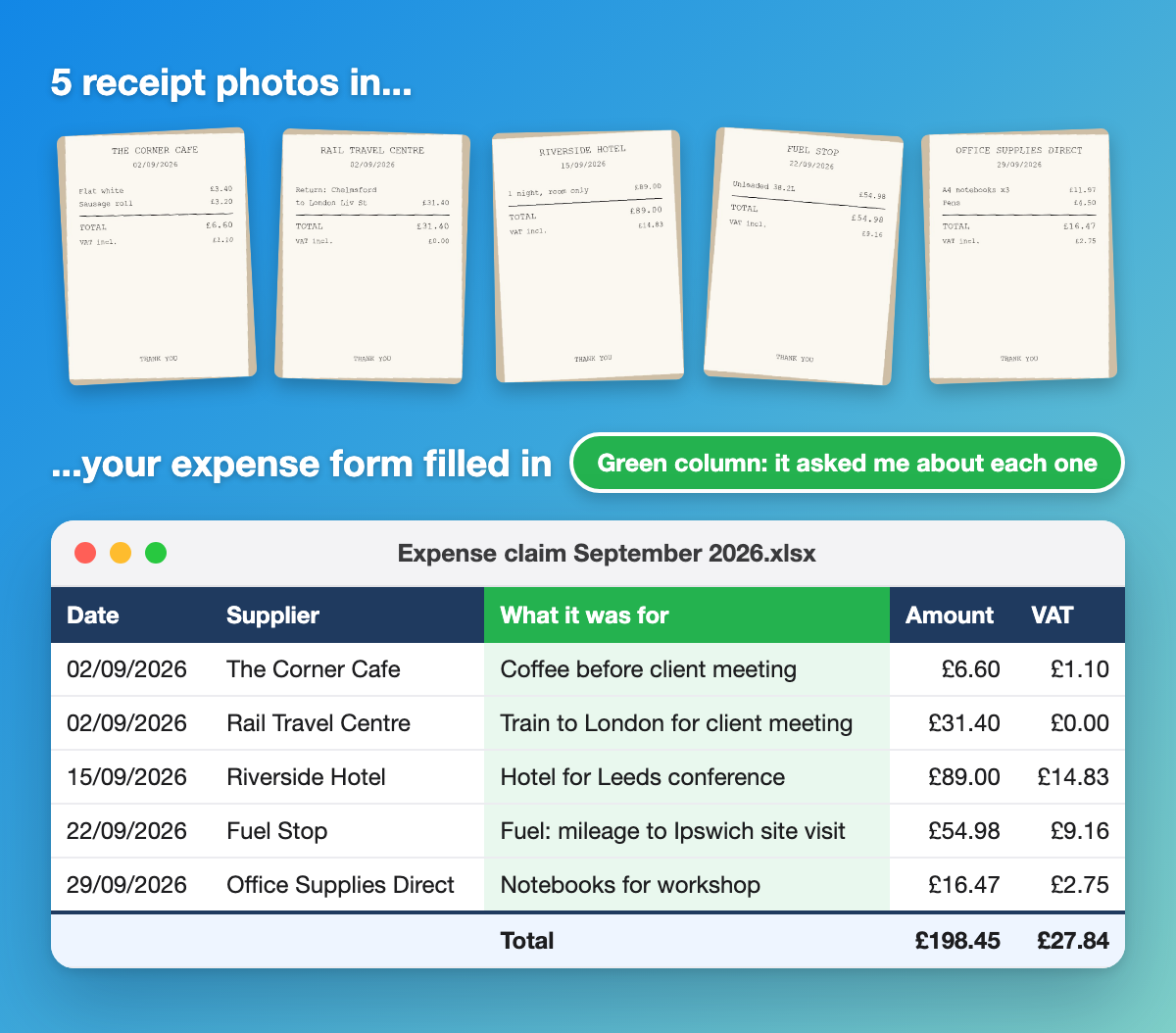
The receipts tell it the date, shop and amount. They don't tell it why you were there, so it asks. That's the "ask me" line doing its job.
Level up: check every receipt against your company's expense policy before you submit. Get the prompt.
5. Check what your competitors charge
This one uses the browser. It visits each site, reads the pricing page and builds a spreadsheet.
Here are five of my competitors: [names or websites]. Go to each website and find what they charge for [your product or service], plus any offers, packages or guarantees they mention. Put it all in a spreadsheet in this folder next to my prices: [your prices]. If a site's pricing isn't clear, tell me rather than guessing. Don't fill in any contact forms or sign up for anything.
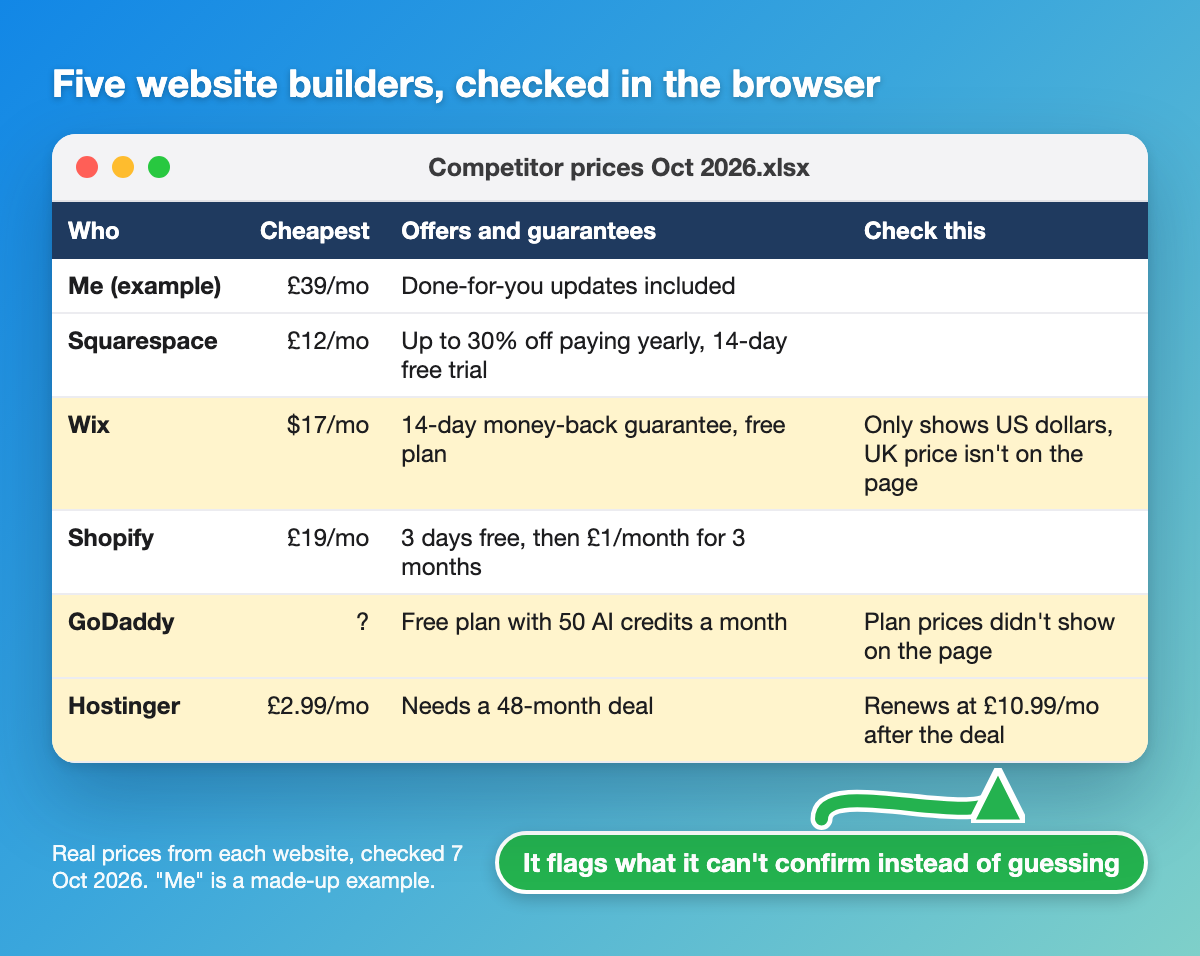
I ran this on five website builders on 7 October 2026 and the prices are real. The useful bit is the "check this" column. Wix only showed US dollars, GoDaddy's plan prices didn't load, and Hostinger's £2.99 a month needs a four-year deal before it renews at £10.99. A human skimming the pages would miss at least one of those.
Level up: run it again next month and get a list of what's changed. Get the prompt.
6. Find out why competitors beat you on Google, then fix it
The most advanced one, and close to how we work on client websites at Glide Marketing. It's done in two goes, with you deciding in the middle.
I want my website to show up on Google for "[the search you want to be found for]". My website is [your web address]. Search for that on Google, look at the top five results and compare their pages with mine: what they cover that I don't, the questions they answer, their page titles and headings, and how much they say. Come back with a list of the differences and what you'd change on my page, most important first. Don't change anything yet.
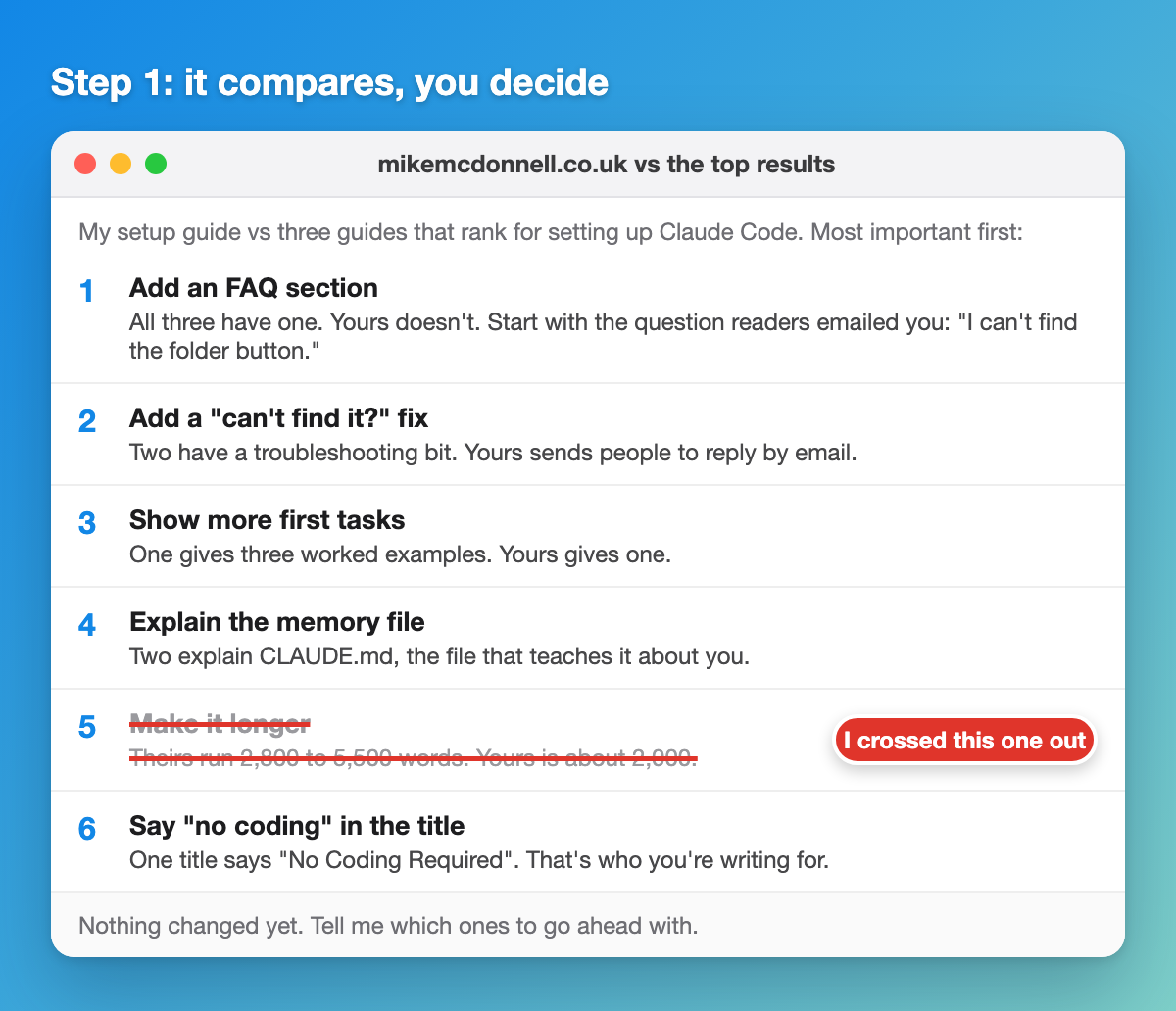
I ran this on my own setup guide. It came back with six changes. I crossed out "make it longer", because padding a page doesn't help the reader, and the rest are now live on the guide. Read the list, cross out anything you don't agree with (you know your customers better than it does), then give it the go-ahead.
Level up: the second prompt, which makes the changes you agreed as a draft for you to check. Get the prompt.
The four bits every agent prompt needs
Look back at those six and they all have the same four parts:
- What you want done. "Sort everything into sub-folders."
- Where the stuff is. "In this folder."
- Ask me questions. So it checks with you instead of guessing.
- Where to stop. "Leave it as a draft", "don't change anything yet", "don't sign up for anything".
Once that shape clicks you'll start spotting jobs for it everywhere. Anthropic's own write-up on building effective agents makes the same point from the engineering side: agents work best with a clear goal, the right tools and a human checking in at the right moments.
Keeping it safe
- One folder. Point it at a folder called AI on your desktop, not your whole computer. It can only touch what's in there.
- Drafts, not live. Anything that publishes, sends or pays stays as a draft until you've checked it.
- Log in yourself. If a site asks you to log in, do it yourself and tell it to carry on. Never type a password into the chat.
- Read before you say yes. Both apps ask permission before reading files, changing things or using the browser.
Questions people ask
What is an example of agentic AI?
Giving AI a folder of receipt photos and a blank expense form, and getting the form back filled in, with questions about anything it couldn't read. It reads the files, works out the steps, does them and checks back with you.
Is ChatGPT an AI agent?
The ChatGPT chat window is a chatbot. Codex, inside the ChatGPT desktop app, is the agent side: it works on the files in a folder you pick and carries out tasks. Claude has the same split, with Claude Code as the agent.
What's the difference between agentic AI and an AI agent?
An AI agent is the thing doing the work, like Claude Code or Codex. Agentic AI is the way it works: plan the steps, use tools, check its own work, ask you when it needs a decision.
What are some business use cases for AI agents?
Start with competitor price checks and comparing your pages with the ones beating you on Google (examples 5 and 6). Expense claims and other admin are good next steps.
What are the best AI agents to try?
Claude Code in the Claude desktop app is what I use all day. ChatGPT Codex is just as good a start if you already pay for ChatGPT. On a budget, OpenCode with a low-cost model like DeepSeek does the same job for pennies. All three are in my setup guide.
Do I need to know how to code?
No. Despite the names, Claude Code and Codex take plain English.
Is it safe to let an AI agent use my computer?
Yes, if you keep it in one folder, keep anything that goes out as a draft and log in to sites yourself.
Get the next one every Sunday
Every one of these started as a task in The Growth Toolkit, my free Sunday email. One AI setup a week, the prompt to copy and a walkthrough. Subscribers also get the level-up prompt for every example above in the prompt library.
More like this:
- How to set up AI on your computer (no coding needed)
- The AI tools I rate for running a business
- The AI personal trainer I built
- Lovable vs Claude Code
- The 60+ tools I use to win back time
Mike McDonnell. I write The Growth Toolkit, a free Sunday email on freeing up time with better tools, AI and setups.
Want more of my posts in your Google results? Add mikemcdonnell.co.uk as a preferred source on Google

Mike McDonnell
Entrepreneur, author, and mental health advocate based in Great Notley, Braintree, Essex. I write about building businesses while managing bipolar disorder.
You might also like
How to Set Up AI on Your Computer (No Coding Needed)
Set up the Claude desktop app or ChatGPT Codex in 15 minutes, no coding needed. Plain-English steps, a fix if you can't find the folder button, and first tasks to try.
I Built an AI Personal Trainer That Checks In on Me (2026)
I was an online PT for 2 years. Here's the AI personal trainer I built that checks in on Telegram every night and reviews my photos. Get the full setup free.
Make.com Review UK: What My Real Automations Cost
An honest Make.com review from a UK agency owner. What Make is, how I use it at Glide Marketing, how the operations-based pricing really works, the pros, the cons, and my verdict.